
How to Make the Cat vs Christmas Tree AI Video From One Pet Photo
The Cat vs Christmas Tree trend copies the cats-and-Christmas-trees clips that come back every December; we used the last scene of the "Cats and the Christmas tree" compilation on TikTok (@fatima.ahmed1354, about 5.4 million plays), where a cat climbs a small decorated tree until it falls over. Here is how to make your own version with your dog or cat: the one-click way, and the do-it-yourself way with the exact prompt we use.
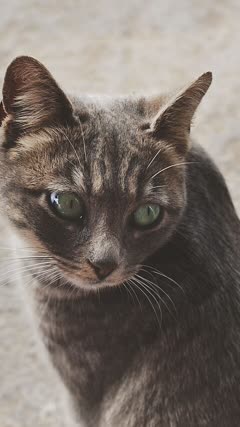 Photo
What you need
- One clear, well-lit photo of one pet, whole body visible, no people in the picture.
- A few minutes while the video renders.
- TikTok, Instagram Reels or CapCut, to add the trending sound.
The one-click way (free)
- Open the Cat Christmas Tree AI template.
- Upload your pet photo and press Make my free video. No sign-up, no prompt to write.
- Watch your 5-second preview a few minutes later. Unlock the download for $2.99, or make 10-second 720p HD videos from $4.99.
Make my Cat vs Christmas Tree video
The do-it-yourself way
You need a video model that takes a photo and a reference video together. We use Seedance 2.0. The photo decides who is in the video; the reference video only decides how it moves.
- Cut a 5 to 10 second clip from the original viral video. This is the motion reference. Make it vertical (9:16) and not too small: around 640 × 640 pixels in total or more, or the model rejects it.
- Give the model your pet photo as Image 1 and the clip as Video 1.
- Paste the prompt below and ask for a 10-second vertical video.
The main character is the pet from Image 1. Video 1 is ONLY a motion reference; the ginger cat in Video 1 must not appear.
10-second vertical video, handheld phone footage in a bright living room with an arched doorway. From the very first frame the pet is clinging inside a small decorated Christmas tree (red poinsettias, gold ribbon bows, red and gold baubles) that stands behind a grey armchair. Keep the pet's species, breed, face, eye color, fur color and markings exactly as in Image 1. The pet's fur color and pattern come ONLY from Image 1, never from the ginger cat in Video 1. Copy the motion from Video 1 beat by beat: the pet wriggles and climbs among the branches, the tree sways harder and harder under its weight, then the whole tree tips over and crashes onto the wooden floor with baubles rolling away, and the pet pops out of the fallen tree unhurt and looks around. Exactly one animal, and it is the pet from Image 1. No people, no human hands, no text, no captions, no logo, no watermark.
Two lines do most of the work. The first says Video 1 is only a motion reference, so the animal from the original does not end up in your video. The last keeps it to one animal, with no people, text or watermark.
Cost tip: with Seedance the reference clip is billed too, at your output resolution. Shrinking it saves nothing; cutting it shorter does.
Tips from making our Cat vs Christmas Tree example
- The original is a 75-second compilation. Cut just the one scene you want (we used the last 6 seconds, where the tree falls) so the model copies one clear action.
- Name the ginger cat in the reference and say your pet's fur comes only from your photo. In one of our tries the model painted a grey tabby ginger like the cat in the clip.
- A photo where the cat's face and markings are sharp is enough; the cat is small in the frame, so the fur color is what people recognise.
Add the sound
Our videos come without audio. Before you post, add All I Want for Christmas Is You, the sound on the original compilation, or any Christmas song from the TikTok or Instagram sound library. The in-app sound is easier than editing music in, and the app takes care of the music license.